ツールバー
VisualARQ ツールバーは、Rhinoのツールバーと同様に動作します:
- 画面の任意の部分にドラッグして移動、または画面の端にドッキングする事ができます。
- ツールバーにボタンを追加/削除してカスタマイズする事ができます。
- 一部のボタンには、左クリックの他右クリックで開くことができる2つ目のコマンドがあり、関連する別のオプションを実行します。
- ボタンの上にマウスを置くと、コマンドの名前を示すツールチップが表示されます。
- 一部のボタン(右下に小さい三角形があるもの)は、他のツールバーにリンクしているドロップダウンボタンです。
ドロップダウンアイコンを左クリックで長押しすると、関連する他のツールバーのコマンドが表示されます。
ツールチップ: アイコン上にマウスを置くと、左/右クリックで実行されるコマンドが表示されます。

Wall アイコンツールチップ(左/右クリック)
A) VisualARQ Objects
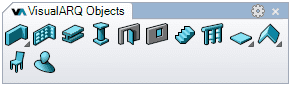
建築オブジェクトの作成と編集を行うコマンド群
 Wall / Wall Style Manager
 Curtain Wall / Curtain Wall Style Manager
 Beam / Beam Style Manager
 Column / Column Style Manager
 Door / Door Style Manager
 Window / Window Style Manager
 Opening / Opening Style Manager
 Stair / Stair Style Manager
 Railing / Railing Style Manager
 Slab / Slab Style Manager
 Roof / Roof Style Manager
 Furniture / Furniture Style Manager
 Element / Element Style Manager
A1) VisualARQ Walls:
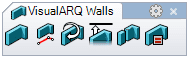
Wallの作成と編集を行うボタン群
- Wall / Wall Style Manager
 From Curves / Set Path
 Reverse
 Extend to Surface
 Split
Split From Solid / Set Custom Solid
A2) VisualARQ Slabs:
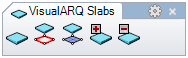
Slabを編集するためのボタン群
 Slab from Curves
 Slab from surface
 Add Boundary
 Subtract Boundary
A3) VisualARQ Roofs:
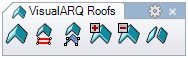
Roofを編集するためのボタン群
 Roof from curve
 Roof from surface
 Add Boundary
 Subtract Boundary
 Explode roof into slabs
B) VisualARQ Documentation Tools
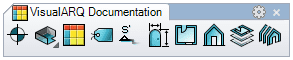
ドキュメンテーションツールに関するボタン群
 Annotation / Annotation Style Manager
 Space / Space Style Manager
 Table / Table Style Manager
 Tag / Tag Style Manager
 Section / Section Style Manager
 Opening Elevations / Opening Elevations Style Manager
 Create Plan View / Plan View Style Manager
 Create Section View / Section View Style Manager
 Level Manager
 Section Manager
B1) VisualARQ Spaces:
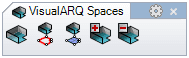
Spaceを編集するためのボタン群
 Space from Curves
 Space from Surface
 Space: element set
 Space: element unset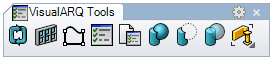
 Update Selected Objects
 Opening Array
 Profile from Curve
 Object Properties
 Document Parameters
 Add Solids
 Subtract Solids
 Extract Solids
C1) Selection commands:
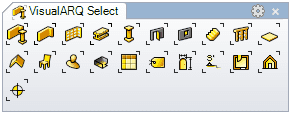
VisualARQオブジェクトを選択するためのボタン群
 Select All objects
 Select walls
 Select Curtain walls
 Select Beams
 Select Columns
 Select Doors
 Select Windows
 Select Stairs
 Select Railings
 Select Slabs
 Select Roofs
 Select Furniture
 Select Elements
 Select Spaces
 Select Tables
 Select Tags
 Select Opening elevations
 Select Sections
 Select Plan views
 Select Section views
 Select Annotations
注: もしVisualARQのインストール後にツールバーが自動的に表示されない場合、または画面に表示されない場合は、以下のようにRhinoツールバーをロードするのと同じ方法を使用してツールバーを手動でロードできます。: コマンドラインに Toolbarと入力して VisualARQ.ruiファイルを開き、表示したいツールバーにチェックを入れます。このファイルは次のディレクトリにあります。:
- Rhino 5.0 (32 and 64-bit): (C:\Users\"UserName"\AppData\Roaming\McNeel\Rhinoceros\5.0\UI)