IFC Export オプションダイアログ
IfcExportOptionsDialog コマンドは、フローティングダイアログボックスを使用して、ドキュメント内の既存のレイヤーに IFC タイプを割り当てることができます。
IFC タイプとは、IFCにエクスポートするときに、オブジェクトのカテゴリを定義するものです。
Ifc Export オプションダイアログ は、[Save] ダイアログ (メニュー:ファイル>名前を付けて保存) から、IFC 2×3ファイル形式を選択した際に表示されるオプション...ボタンをクリックしても起動できます。
Steps:
- 表示されたリストからIFCタイプを割り当てるには、各レイヤの横にあるIFC Entity Typeをクリックします。
各レイヤの名前の横にあるチェックボックスをオンにすると、そのレイヤのジオメトリが IFC にエクスポートされるかどうかを選択できます。
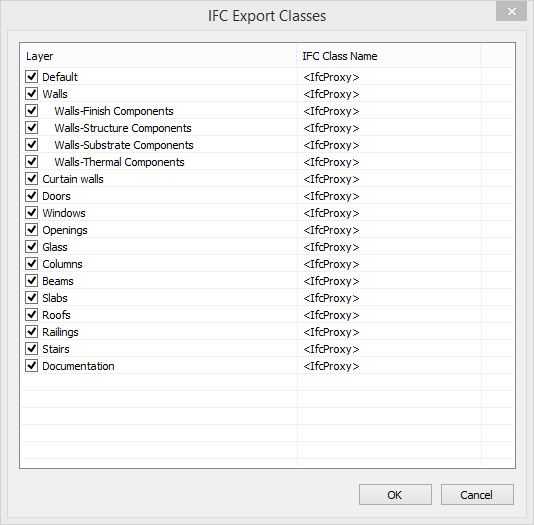
IFC Export Types ダイアログ
IFC Type プロパティ
- No export: オブジェクトは IFC にエクスポートされません。
- Ifc Proxy: オブジェクトは、プロキシまたは汎用ジオメトリ として IFC にエクスポートされます。
- IfcBeam
- IfcColumn
- IfcCovering
- IfcCurtainWall
- IfcDoor
- IfcFooting
- IfcMember
- IfcPile
- IfcPlate
- IfcRailing
- IfcRamp
- IfcRampFlight
- IfcRoof
- IfcSlab
- IfcStair
- IfcStairFlight
- IfcWall
- IfcWindow
- IfcWall
- IfcBuildingElementPart
- IfcReinforcingBar
- IfcReinforcingMesh
- IfcTendon
- IfcTendonAnchor
- IfcDistributionElement
- IfcEnergyConversionDevice
- IfcFlowFitting
- IfcFlowMovingDevice
- IfcFlowSegment
- IfcFlowStorageDevice
- IfcFlowTerminal
- IfcFlowTreatmentDevice
- IfcElectricalElement
- IfcElementAssembly
- IfcDiscreteAccessory
- IfcFastener
- IfcMechanicalFastener
- IfcEquipmentElement
- IfcFurnishingElement
- IfcTransportElement
- IfcVirtualElement